Everything BeepBack does, from missed call to ready-to-call lead
When you can’t pick up, BeepBack texts back in your business’s name, gathers what they need, how soon, where, and who’s calling, then alerts you when the lead is ready. Every screen below is the real app.
$79/month flat · First month free, starting the day your texting goes live · Keep your number · About 10 minutes to set up
Don’t book jobs? See how BeepBack works for offices, studios, and front desks →

The first screen you see, on a laptop or a phone. What was caught, what’s booked, and an estimate of what this week’s qualified leads are worth. The real app, seeded with demo data. Open full size
Chapter one
A text in your name within seconds, then a few short questions. To your caller it reads like you texted back.
2:14 PM
The ringing stops, and seconds later a text from your business is in the caller’s hand. You didn’t do anything. That’s the point.
The caller sees your name, not ours. The text goes out from a dedicated number registered to your business, and the word BeepBack never appears.
Only when you miss the call. If you answer, nothing sends. BeepBack only ever texts back someone who just called you, never a cold list.
Nights, weekends, mid-job. Emergencies don’t keep business hours, and neither does the text-back.
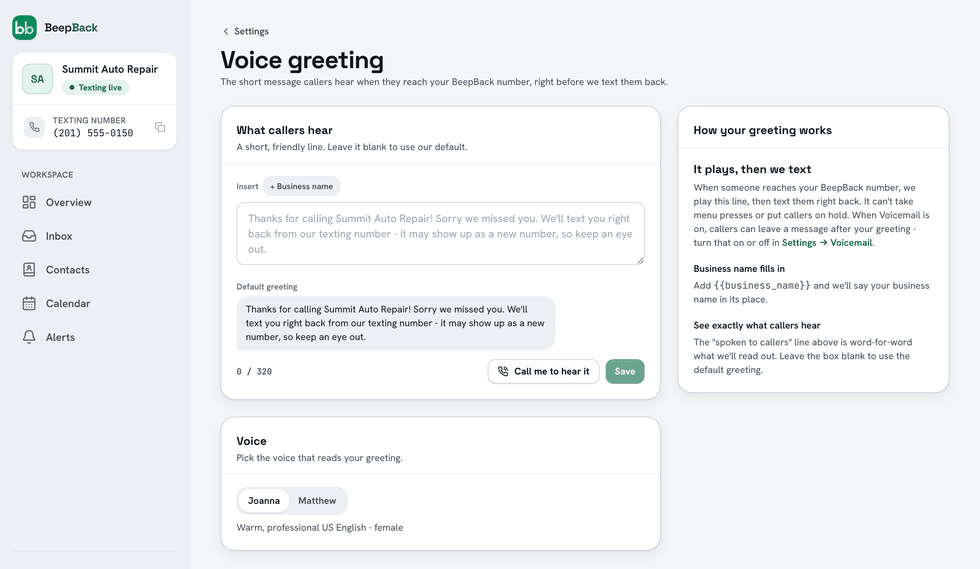
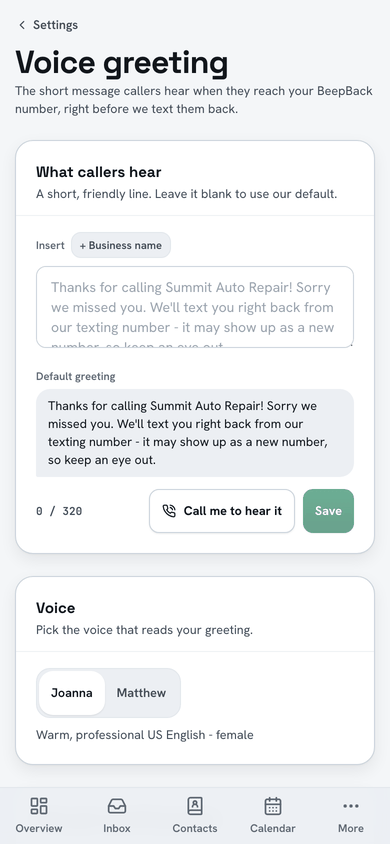
On the standard forwarding setup a missed call doesn’t just ring out. BeepBack answers with a short spoken line in your business’s name, out of the box "Thanks for calling Summit Auto Repair! Sorry we missed you. Leave a message with what you need and we’ll be in touch shortly.", offers to take a message, and the text takes it from there. No hold music, no press 1.
Most callers never leave a voicemail, and they get your text either way. If they do leave one, BeepBack transcribes it and it lands in your dashboard as a lead you can read or play, instead of sitting in a mailbox.
2:15 PM
Anyone can send "sorry we missed you." The questions are what book the job. BeepBack runs a short back-and-forth for the four things you’d want before you call back:
Everything the caller said is sent straight to you, and emergencies jump the line. Most software that can text a missed caller sends one canned line and stops. BeepBack starts where that gives up.
The exact texts BeepBack sends out of the box
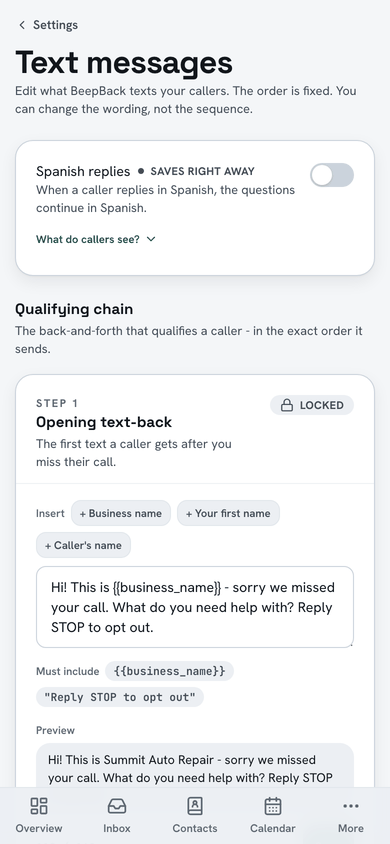
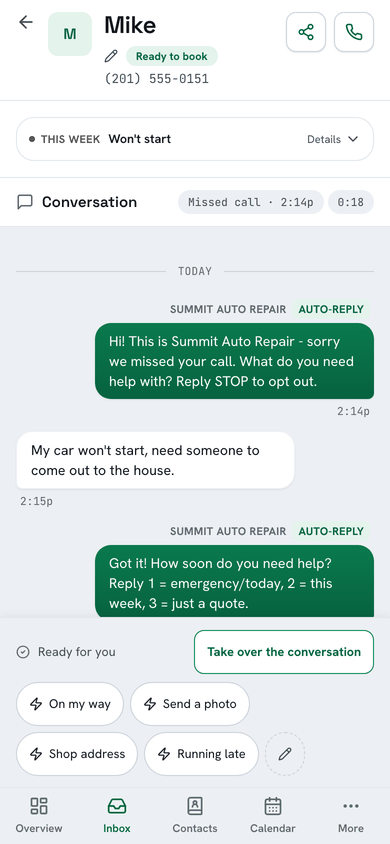
Hi! This is Summit Auto Repair - sorry we missed your call. What do you need help with? Reply STOP to opt out.
Hi, car won’t start. Can someone come out to the house?
Got it! How soon do you need help? Reply 1 = emergency/today, 2 = this week, 3 = just a quote.
2 - this week. Thursday morning works. 42 Maple Ave. It’s Mike.
Thanks Mike! You're all set - Alex will reach out to confirm. Anything else we should know? A photo helps too.
Mike called at 2:14 and got no answer. This is your side of what BeepBack did next. Your business name goes in, and the wording is yours to change.
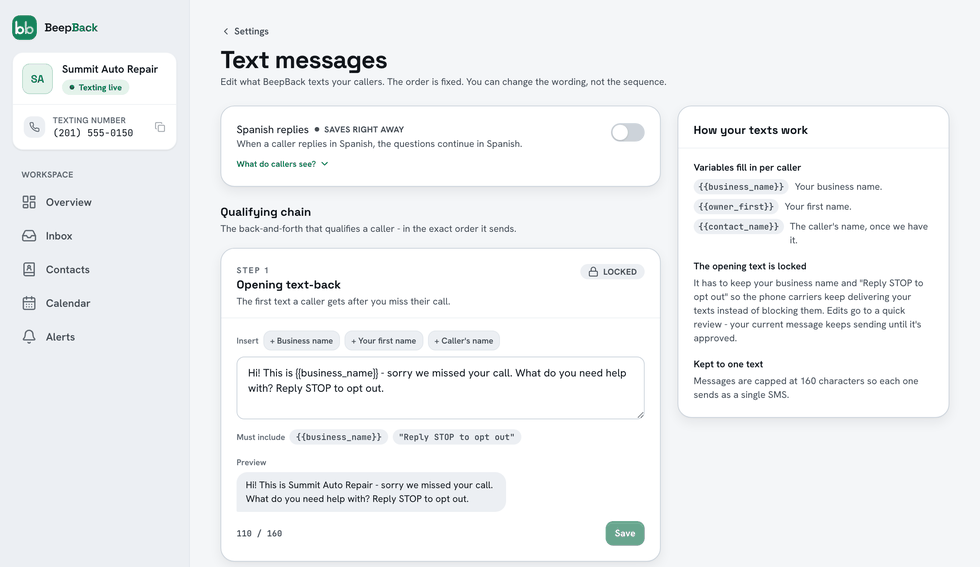
Every caller-facing message is a pre-written template: the same approved wording every time, never an AI composing replies on the fly. You know the exact words before they go out, because you wrote or approved them.
The assistant asks its questions in English. If a caller answers in another language, or in a way it can’t confidently sort, it doesn’t guess: you get an alert that a lead needs you, and you take over. Turn on Spanish replies and a caller who answers in Spanish gets the rest of the questions in Spanish.
Chapter two
The lead reaches you, written up and sorted by how soon they need you, and it keeps reaching you until you open it.
The moment they reply
By text, by email, and in the app.
About ten minutes
If a possible emergency goes unopened, a reminder follows.
About thirty minutes
Still unopened? Your cell rings. A middle-of-the-night emergency can’t slip by.
Opening the lead stops the alerts. Not the only one watching the phone? Add a second phone, and an optional email, under "Also alert someone else" in Settings: that person gets the same new-lead and emergency alerts you do, including the emergency call, and can reply STOP anytime to opt out.
4:37 PM
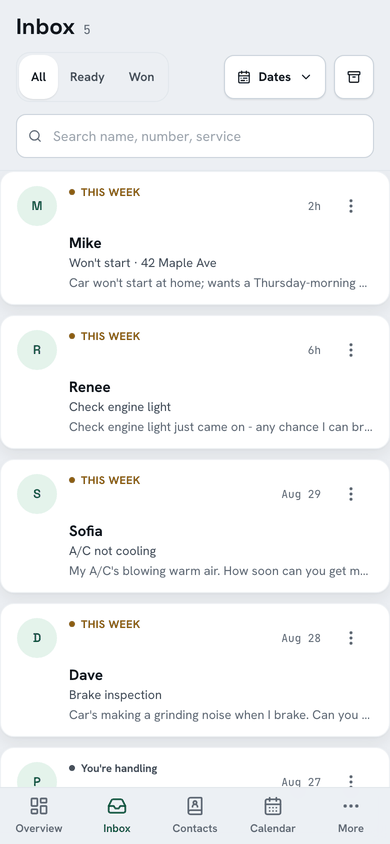
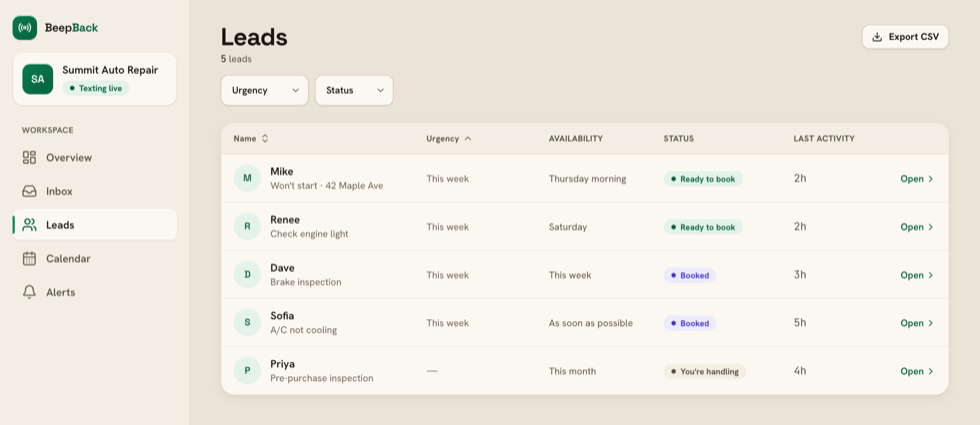
Every missed call ends up here: details pulled out, an AI summary, and your next move one tap away.
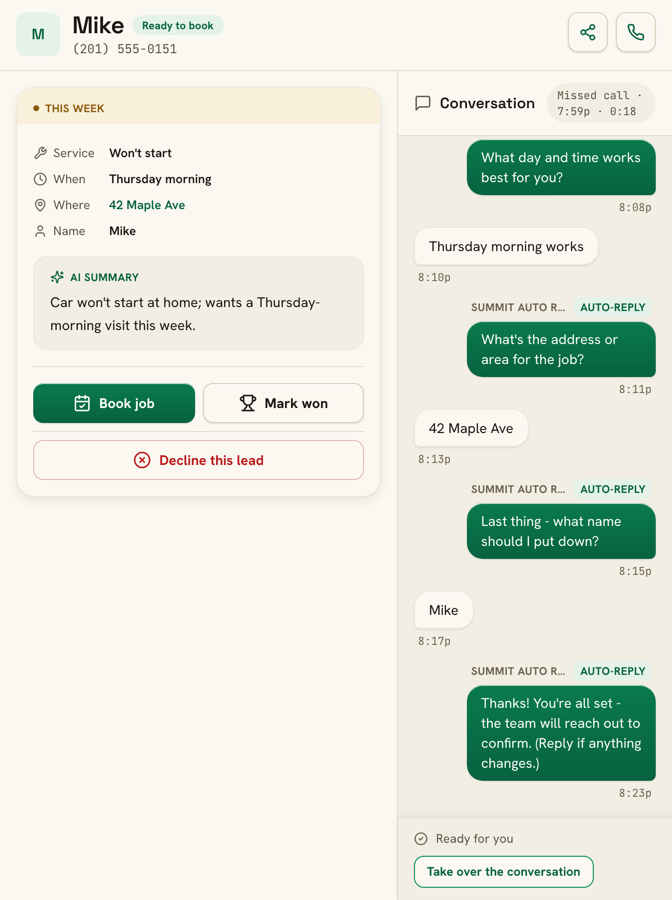
Take over any conversation and the assistant pauses; your reply goes out from your business’s number, so the caller never sees your personal cell. The lines you type over and over live as quick replies that send in two taps. Book a job and the caller gets a confirmation text; can’t take it, and a courteous decline goes out instead.
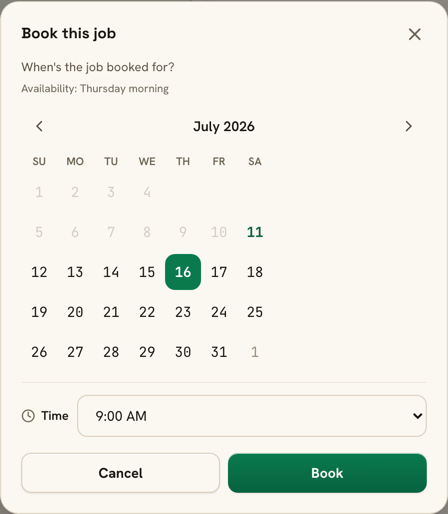
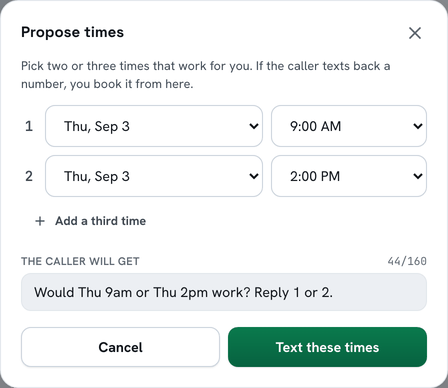
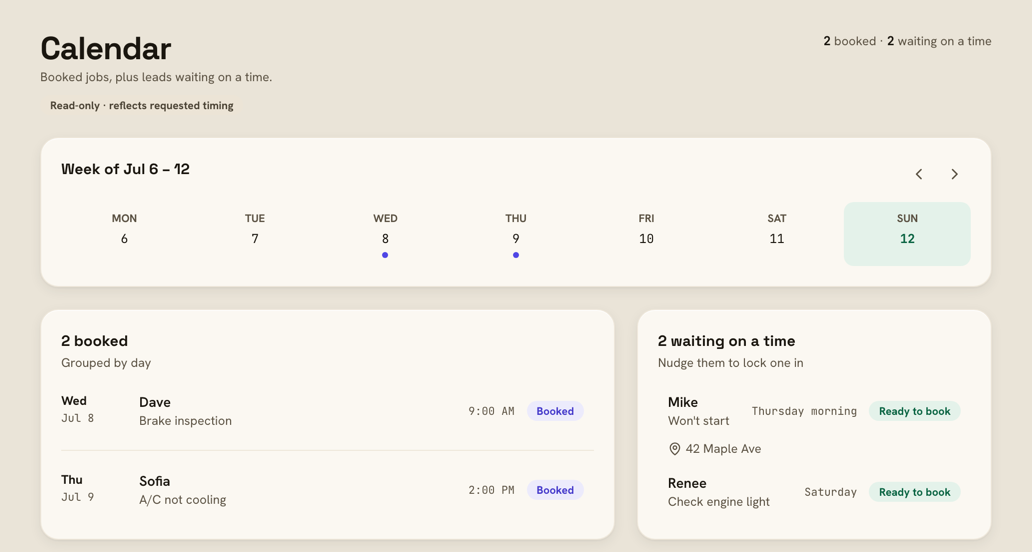
Can’t pin down the time from their texts alone? Propose times sends two or three slots you pick ("Would Tue 9am or Tue 2pm work? Reply 1 or 2."), the answer lands back in the thread, and the slots you offered become one-tap picks when you book. Your booked week can follow you into Google, Apple, or Outlook as a read-only feed; BeepBack never reads or changes your own calendar.
Callers on landlines don’t disappear either. Every missed call is logged the moment it happens, even when a text can’t be delivered, so you see the number and call back. Numbers that can’t receive texts are never texted again.
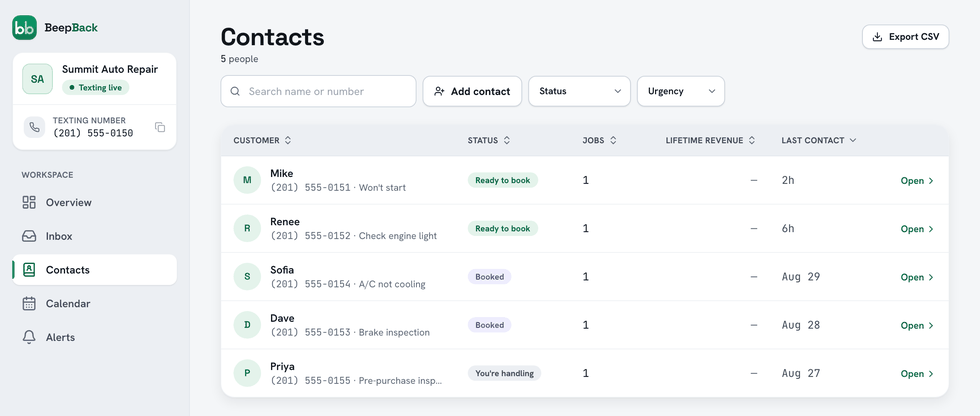
Contacts keeps one row per person, with every job, what each was worth, and notes only you see. When a past customer calls again, their lead carries a "Returning customer" badge with the count of prior jobs, and export the whole list as a CSV whenever you like.
About ten minutes to set up. You’re not charged until your number is live and texting.
Chapter three
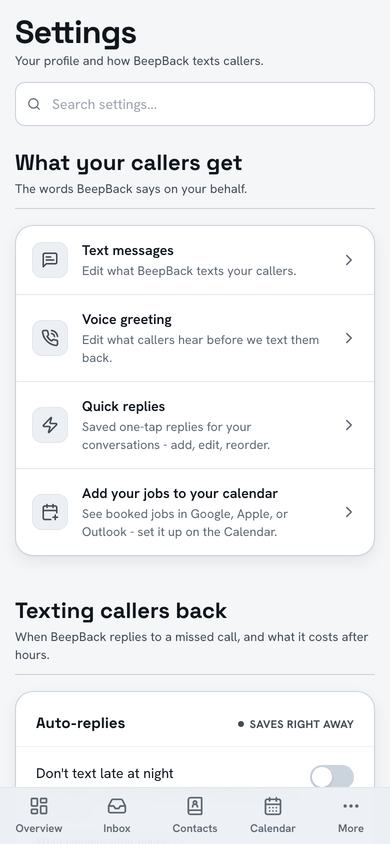
Set it once and forget it, or tune every switch. You can tell a product is finished by its switches; here are BeepBack’s.
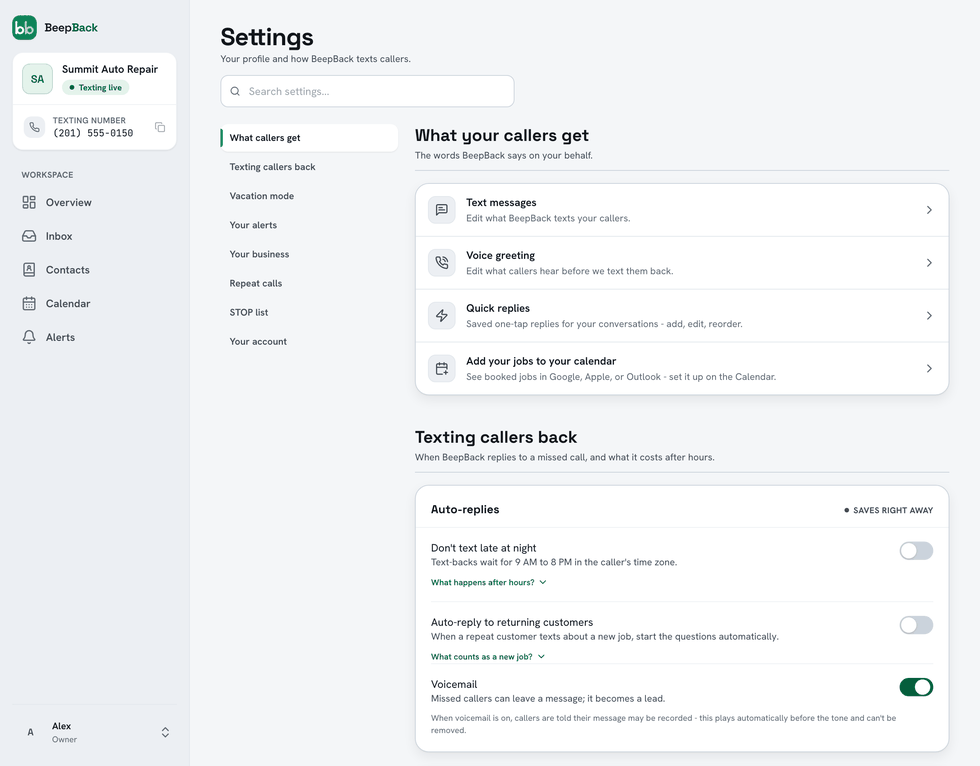
The one line that is ours is a short recording notice before the beep. Some states require it, so it can’t be switched off, and that’s one compliance job off your plate. The recordings and transcripts are yours.
Your texts land because your number is registered with the carriers under your business, not ours, which is how they tell real business texting from spam. We do the paperwork. Nobody can promise what every filter does, but registration in your name, low volume, and instant STOP handling are exactly what the carriers ask for, and BeepBack does all three.
Setup takes about ten minutes, then the carriers verify your business, about two weeks, and almost none of that is us. No LLC or EIN needed: they verify you personally with a one-time code texted to your cell, and we never ask for your Social Security number. BeepBack is US-only. The wait isn’t dead time either: from the day your forwarding is set, missed calls are answered and land here as real leads, and the portal starts pre-filled with clearly labeled sample leads so you can see the shape of one.
Monday morning
A scoreboard lands in your inbox: what was caught, what was booked, and what it made you.
Missed calls caught, callers texted back, leads qualified, jobs won, and how fast the text-back went out, every Monday by email with a one-line text version. On the first of the month, a report card does the same for the month.
Mark a job won and enter what it was worth; the scoreboard adds up those wins and shows what they covered ("Your plan: $79. This week’s wins covered it 24x."). BeepBack never invents a revenue figure: that headline number is your own entries, and anything estimated is labeled an estimate.
Set it up on the number you already have, and the next 2:14 answers itself.
$79/month flat. First month free, starting the day your texting goes live.